
Picking the right web host can feel overwhelming. Countless options exist. This Kinsta hosting review aims to simplify your decision, exploring Kinsta’s features, performance, and pricing.
This Kinsta hosting review comes from my own experience managing websites for over a decade. I’ve used cheap shared hosting, clunky VPS setups, and even dedicated servers.

Honest Kinsta Review - HostingRadar.co Rating
- Speed
- Uptime
- Affordability
- Features
- Support
Overwhelmed by website maintenance and management?
Are you terrified that updating your website plugins or theme will break everything?
You’re not alone.
Today’s dynamic websites can be incredibly overwhelming. With so many plugins, themes, notifications, patches, and security updates, managing your site can quickly become too complex.
Our professional partners offer a lifeline in this sea of complexities.
Designed specifically for those overwhelmed by websites and digital marketing, our expert partners take the weight off your shoulders. They handle the technical side, ensuring your site is fast, secure, and updated, leaving you to focus solely on your business.
Ready for relief from your website-induced anxiety? Contact one of our expert partners today!
How To Create A Website For Free: Get The Guide!
Kinsta: A Deep Dive
Kinsta specializes in managed WordPress hosting. It’s a premium managed WordPress host, handling many technical tasks, so you can focus on content and audience growth. This is invaluable for small business owners without a dedicated IT team. Unlike CloudWays and FlyWheel, Kinsta allows full custom setups.
Performance and Speed
Kinsta uses the Google Cloud Platform, offering advantages for Core Web Vitals, security, and performance. However, consider the cost implications. This setup is ideal for businesses with sudden traffic spikes.
Its scalability ensures your WordPress site handles traffic surges, maintaining uptime and page speed. Unlike shared or VPS options that can limit growth, cloud hosting like Kinsta is ideal for scaling businesses.
As your website grows, upgrading to cloud hosting is crucial. Kinsta offers better resource allocation, seamless service, enhanced security features, premium technical support, and fast load times. Shared hosting, conversely, heavily relies on plugins for optimization.
With 24 global data centers, choose the one closest to your audience to minimize distance. Even milliseconds matter and impact overall site performance. This makes Kinsta a powerful hosting solution with great support.

More Web Hosting Reviews




Security
Website security is crucial, especially for small businesses. Many startups overlook security, making them vulnerable to attacks.
I’ve seen firsthand how early-stage websites can be targeted when they gain popularity. Hackers exploit the lack of security measures on these sites.
Kinsta takes security seriously, providing a hack-free guarantee. I’ve tested this on my own websites. Kinsta’s security measures, including free malware removal, make it a secure transport for your WordPress site.
Kinsta integrates with Cloudflare for basic firewall protection and handles spam attacks and DDoS attacks. They offer server-level security, SFTP, SSH security, and daily backups.
When comparing hosting companies and pricing, prioritize security. A secure website is essential, even if it comes at a premium. Hosting plans should factor in these security features.
User-Friendly Dashboard
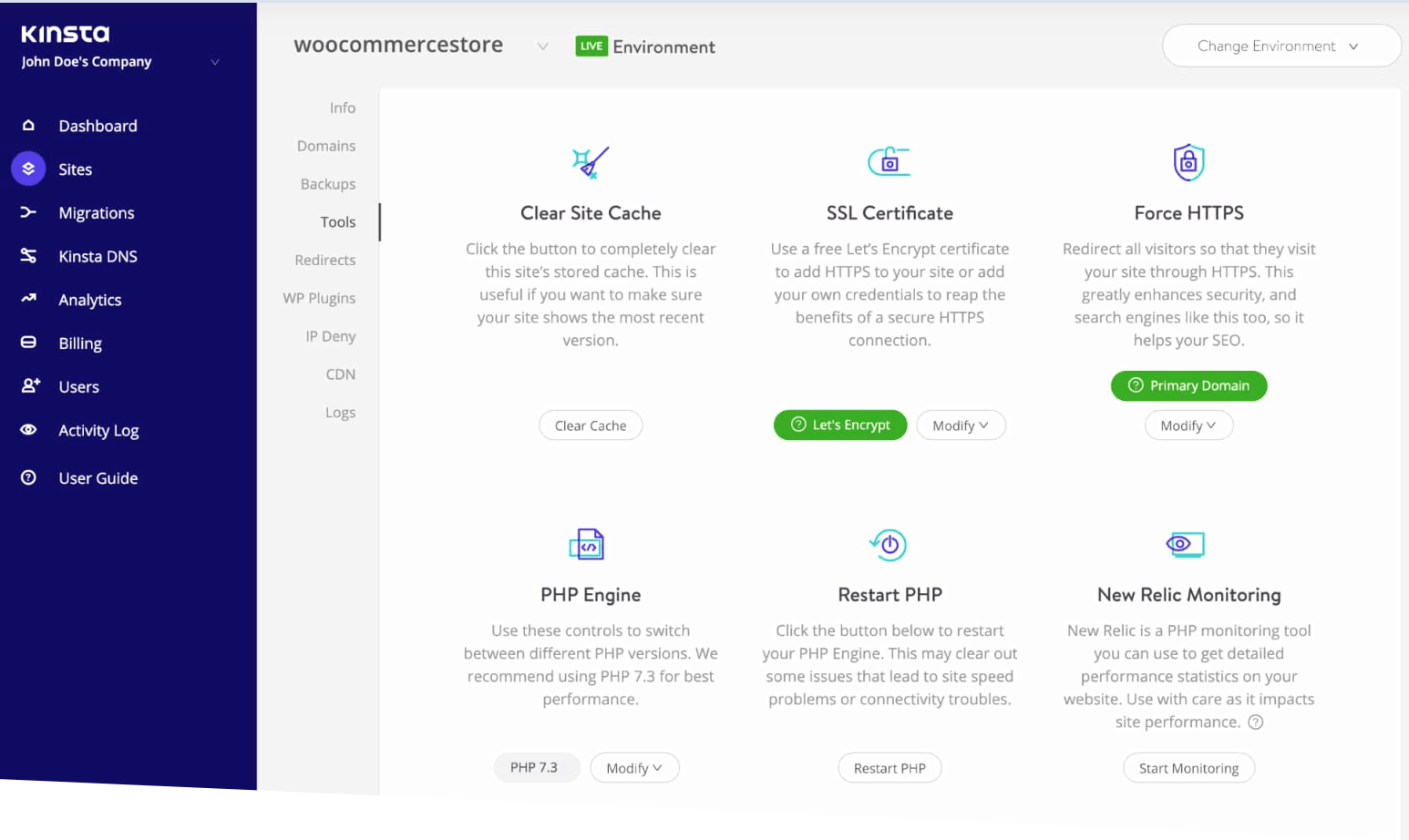
Kinsta’s MyKinsta dashboard is far superior to cPanel. Users switching from shared hosting find it easier to navigate and manage plugins.
MyKinsta simplifies tasks like updates, rollbacks, cloning between staging and live environments, and manual backups. Its purpose-built design streamlines processes that would typically require complex coding.
Customer Support
Technical difficulties can arise anytime, making reliable support essential. Kinsta offers support via Intercom, a familiar platform for many.
Kinsta’s customer support is highly responsive, a major advantage over slower shared hosting support tiers. Direct access to live chat is invaluable, especially during critical situations. Some hosts only offer forms and automated follow-ups, requiring a 24-48 hour wait time.

Kinsta Hosting Review: Is It Right for You?
Choosing Kinsta depends on budget, experience, traffic patterns, and support needs. Consider whether immediate live response or phone support justifies the higher price. Kinsta might be the right managed host for you. Kinsta WordPress hosting offers a lot of features.
Kinsta’s features benefit busy e-commerce shops and media-heavy websites. Its performance enhancements justify the premium pricing for high-traffic sites generating revenue through ad conversions. You can even get started with a starter plan.
If you’re starting a simple blog or hobby site, Kinsta might be overkill. The Starter plan, while feature-rich, may be unnecessary. Basic WordPress plugins on cheaper shared hosting plans can suffice. Learn more about what Kinsta offers in this Kinsta review.
FAQs about Kinsta hosting review
Is Kinsta a good host?
Kinsta is an excellent host for WordPress sites requiring top-tier performance, security, and support. Its high cost may not suit small or budget-conscious projects. However, the global data centers and staging environment makes Kinsta hosting great for larger businesses.
Is Kinsta an hosting provider?
Yes, Kinsta is a managed WordPress hosting provider. Learn more with this Kinsta host review.
How secure is Kinsta?
Kinsta is highly secure, employing DDoS protection, malware scanning, hardware firewalls, a continuous monitoring tier network and a hack-fix guarantee. This keeps your WordPress website and static sites safe.
Is Kinsta worth it on Reddit?
Reddit opinions on Kinsta vary. Some users laud its performance and support, while others find it expensive. The consensus: it’s a premium service best suited for those with a budget who want a managed WordPress hosting company.
Conclusion
This Kinsta hosting review highlights the importance of aligning your choice with your website’s needs and priorities. Do you value expert support and secure servers? Kinsta excels in these areas. Find out what the load time is like with a Kinsta load test, or compare Kinsta with WP Engine.
If budget is a primary concern, reassess your needs and analyze various hosting providers. Shared hosting with standard WordPress plugins can be cost-effective. You can find affordable managed hosting from different providers.
If speed and reliability are paramount, Kinsta’s Enterprise plan provides comprehensive features and support. For businesses where downtime has severe consequences, Kinsta’s robust infrastructure, monitoring, and support are essential. Even get an SSL certificate.
Check out HostingRadar’s partner page, where you can find expert support from providers who use and resell the best website hosting services in the world.
These providers add a dedicated account manager in front of your hosting company to manage your services and guide you through the digital marketing minefield.
Contact an expert for a no-obligation consultation today!
New WordPress site? Read this helpful and essential guide: 30+ Things To Do After Installing WordPress.
Related: What is Cloud Hosting? What Is VPS? 7 Different Types Of Web Hosting Solutions Explained
See Kinsta’s Pricing Plans here
Keep Reading
Pin This: